Brands Can Now Buy Video Ads on LinkedIn
Mashable
Click on the image to read the original post
LinkedIn is rolling out global video advertising, the professional social network announced Tuesday.
Business owners can now promote their brands using video ads through LinkedIn Ads, the site’s self-serve platform, which says it lets users control costs, pay per view or click and, stop their campaign. Until now, companies could only advertise text and image ads to LinkedIn’s 175 million members.
SEE ALSO: How Small Businesses Can Use LinkedIn to Recruit
The video ads will appear in 300×240 ad units in size, and will compete for impressions the same way that text and image ads do, according to Will Hambly, LinkedIn’s online marketing manager.
When a LinkedIn member is engaged and clicks on your video ad, the video will take over the entire 300×250 ad unit and play a 30 second video,” he writes in a blog post. “After the video completes, users will still be able to click through to your landing page or visit your website, just like with current ads.”
Companies have the option of importing new videos or using ones they’ve already uploaded to their YouTube channel; the latter can help capture new LinkedIn audiences, while continuing to attract viewers on the video-sharing site.
SEE ALSO: Watch a Live Tour of the New LinkedIn
Last week, LinkedIn unveiled a new look for profile pages, and debuted new features along with updated versions of its apps.
Business owners can now promote their brands using video ads through LinkedIn Ads, the site’s self-serve platform, which says it lets users control costs, pay per view or click and, stop their campaign. Until now, companies could only advertise text and image ads to LinkedIn’s 175 million members.
SEE ALSO: How Small Businesses Can Use LinkedIn to Recruit
The video ads will appear in 300×240 ad units in size, and will compete for impressions the same way that text and image ads do, according to Will Hambly, LinkedIn’s online marketing manager.
When a LinkedIn member is engaged and clicks on your video ad, the video will take over the entire 300×250 ad unit and play a 30 second video,” he writes in a blog post. “After the video completes, users will still be able to click through to your landing page or visit your website, just like with current ads.”
Companies have the option of importing new videos or using ones they’ve already uploaded to their YouTube channel; the latter can help capture new LinkedIn audiences, while continuing to attract viewers on the video-sharing site.
SEE ALSO: Watch a Live Tour of the New LinkedIn
Last week, LinkedIn unveiled a new look for profile pages, and debuted new features along with updated versions of its apps.
Read Our Blog On How To Use LinkedIn For Business
Click the button below
10 LinkedIn Tips for Building Your Business
By Jeff Korhan

Why LinkedIn for Networking?
The Start-Up of You, a recent book co-authored by LinkedIn founder Reid Hoffman, notes that companies don’t give you business – people do.
Many of your LinkedIn connections can introduce you not only to business influencers and partners, but also refer your company to new customers.
In the book, Mr. Hoffman also states a key point about business networking:
“It’s better to be the best connected than the most connected.”
In addition to teaching you new skills, that’s what this article will help you accomplish.
A personal LinkedIn profile is commonly viewed as an online resume or digital business card, and using it for that is a good start.
However, you can take that further – going beyond LinkedIn’s basic capabilities – to build a more powerful means of attracting and managing your connections and professional online presence to encourage more business opportunities.
10 Tips for LinkedIn
The following 10 LinkedIn features and best practices will enable you to not just make connections on LinkedIn, but to leverage your network to become more visible, better engaged and armed with business intelligence that will accelerate the growth of your business.
These practices are organized into three distinct categories so you can realize the synergies of their combined benefits.
One point of clarity before we get started – all of these features are available with a standard, free LinkedIn account. More advanced features are available by upgrading to one of the premium accounts.
Optimize for Search Discovery and Ranking
A primary reason for having a complete and descriptive LinkedIn profile that speaks to your expertise and capabilities is to rank well in a general search. In fact, you may have discovered one of the easiest ways to look up business professionals online is to simply Google their name followed by the words “on LinkedIn.”
Taking that a step further, one particular advantage LinkedIn has over other networking sites is its internal search capabilities. You can improve your search discovery and ranking within LinkedIn in just a few short weeks when you optimize your personal profile with the following four tips.
The Start-Up of You, a recent book co-authored by LinkedIn founder Reid Hoffman, notes that companies don’t give you business – people do.
Many of your LinkedIn connections can introduce you not only to business influencers and partners, but also refer your company to new customers.
In the book, Mr. Hoffman also states a key point about business networking:
“It’s better to be the best connected than the most connected.”
In addition to teaching you new skills, that’s what this article will help you accomplish.
A personal LinkedIn profile is commonly viewed as an online resume or digital business card, and using it for that is a good start.
However, you can take that further – going beyond LinkedIn’s basic capabilities – to build a more powerful means of attracting and managing your connections and professional online presence to encourage more business opportunities.
10 Tips for LinkedIn
The following 10 LinkedIn features and best practices will enable you to not just make connections on LinkedIn, but to leverage your network to become more visible, better engaged and armed with business intelligence that will accelerate the growth of your business.
These practices are organized into three distinct categories so you can realize the synergies of their combined benefits.
One point of clarity before we get started – all of these features are available with a standard, free LinkedIn account. More advanced features are available by upgrading to one of the premium accounts.
Optimize for Search Discovery and Ranking
A primary reason for having a complete and descriptive LinkedIn profile that speaks to your expertise and capabilities is to rank well in a general search. In fact, you may have discovered one of the easiest ways to look up business professionals online is to simply Google their name followed by the words “on LinkedIn.”
Taking that a step further, one particular advantage LinkedIn has over other networking sites is its internal search capabilities. You can improve your search discovery and ranking within LinkedIn in just a few short weeks when you optimize your personal profile with the following four tips.
|
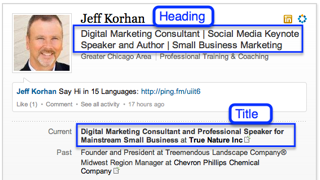
#1: Use Appropriate Keywords and Phrases in Your Heading and Title
Many people consider their LinkedIn heading to be synonymous with their title, but there is a difference. Your title is indeed important for being findable for a LinkedIn search, but your heading is a valuable opportunity for extending it further by emphasizing and elaborating on your skills, areas of expertise and your ideal customers. |
|
#2: Mirror Your Online and Offline Business Networks within LinkedIn
To maximize your benefit from LinkedIn, you should consider importing all of your online and offline business contacts into it, while also being diligent about making frequent updates.
Every network is a web of connections, which are known as social graphs – digital maps that lead new connections to you. When you import all of your other business contacts into LinkedIn, you not only ensure its completeness and relevance to reality, you also maximize the aggregate value of your LinkedIn network.
The following video on LinkedIn Maps illustrates how this works.
To maximize your benefit from LinkedIn, you should consider importing all of your online and offline business contacts into it, while also being diligent about making frequent updates.
Every network is a web of connections, which are known as social graphs – digital maps that lead new connections to you. When you import all of your other business contacts into LinkedIn, you not only ensure its completeness and relevance to reality, you also maximize the aggregate value of your LinkedIn network.
The following video on LinkedIn Maps illustrates how this works.
|
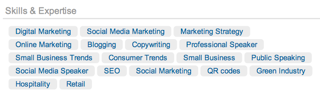
#3: Tag Your Skills and Expertise
While tagging your skills and expertise does not presently seem to make a significant difference for LinkedIn search, this may well be the case in the future after this feature moves out of beta. For the time being, consider tags to be additional information that may prove useful for someone who happens upon your LinkedIn profile. |
|
#4: Link to Your Websites with Keyword Anchor Text
LinkedIn provides the capability to link your personal profile to up to three websites or pages, including your company website, personal website or blog.
If this is done properly, you can have those links attached to your chosen keywords and phrases, thereby further enhancing your search engine optimization (SEO) both within LinkedIn and on the open web. The secret is using the “other” category to enable this option.
This video will demonstrate how to maximize the value of the outbound links from your personal LinkedIn Profile.
LinkedIn provides the capability to link your personal profile to up to three websites or pages, including your company website, personal website or blog.
If this is done properly, you can have those links attached to your chosen keywords and phrases, thereby further enhancing your search engine optimization (SEO) both within LinkedIn and on the open web. The secret is using the “other” category to enable this option.
This video will demonstrate how to maximize the value of the outbound links from your personal LinkedIn Profile.
Personalize for Engagement and Interaction
You can maximize your results from LinkedIn from the moment you make a new connection. This starts with having a profile that encourages others to engage with you – one that presents you as interesting and approachable.
You already know that using conversational language and having an engaging profile picture make you more personal and attractive. If you are willing to invest a little more effort, the following three tips will prove to be invaluable for opening doors to new opportunities.
#5: Personally Welcome and Acknowledge Your New ConnectionsMy experience is that few people acknowledge new connections with a personal reply, something that takes just a few seconds.
This is why this strategy is so valuable for developing relationships and standing apart from others who are just collecting connections.
#6: Add Video to Your Profile to Make it Come Alive
There are two applications for adding video to your LinkedIn profile – the Google Presentations app and the SlideShare app. Having worked with both, my experience is that the SlideShare app is more reliable.
If you know how to embed a video in a PowerPoint presentation, then you can easilyput a video in your LinkedIn profile with the SlideShare app. You can embed the video in the first slide and set it to launch when your profile is accessed, or use the first slide to introduce the video.
This video will demonstrate how to add video to your personal LinkedIn Profile.
You can maximize your results from LinkedIn from the moment you make a new connection. This starts with having a profile that encourages others to engage with you – one that presents you as interesting and approachable.
You already know that using conversational language and having an engaging profile picture make you more personal and attractive. If you are willing to invest a little more effort, the following three tips will prove to be invaluable for opening doors to new opportunities.
#5: Personally Welcome and Acknowledge Your New ConnectionsMy experience is that few people acknowledge new connections with a personal reply, something that takes just a few seconds.
This is why this strategy is so valuable for developing relationships and standing apart from others who are just collecting connections.
#6: Add Video to Your Profile to Make it Come Alive
There are two applications for adding video to your LinkedIn profile – the Google Presentations app and the SlideShare app. Having worked with both, my experience is that the SlideShare app is more reliable.
If you know how to embed a video in a PowerPoint presentation, then you can easilyput a video in your LinkedIn profile with the SlideShare app. You can embed the video in the first slide and set it to launch when your profile is accessed, or use the first slide to introduce the video.
This video will demonstrate how to add video to your personal LinkedIn Profile.
#5: Personally Welcome and Acknowledge Your New Connections
My experience is that few people acknowledge new connections with a personal reply, something that takes just a few seconds.
This is why this strategy is so valuable for developing relationships and standing apart from others who are just collecting connections.
#6: Add Video to Your Profile to Make it Come Alive. There are two applications for adding video to your LinkedIn profile – the Google Presentations app and the SlideShare app. Having worked with both, my experience is that the SlideShare app is more reliable.
If you know how to embed a video in a PowerPoint presentation, then you can easilyput a video in your LinkedIn profile with the SlideShare app. You can embed the video in the first slide and set it to launch when your profile is accessed, or use the first slide to introduce the video.
This video will demonstrate how to add video to your personal Linked
My experience is that few people acknowledge new connections with a personal reply, something that takes just a few seconds.
This is why this strategy is so valuable for developing relationships and standing apart from others who are just collecting connections.
#6: Add Video to Your Profile to Make it Come Alive. There are two applications for adding video to your LinkedIn profile – the Google Presentations app and the SlideShare app. Having worked with both, my experience is that the SlideShare app is more reliable.
If you know how to embed a video in a PowerPoint presentation, then you can easilyput a video in your LinkedIn profile with the SlideShare app. You can embed the video in the first slide and set it to launch when your profile is accessed, or use the first slide to introduce the video.
This video will demonstrate how to add video to your personal Linked
Trouble getting connected? Here are the 11 Best Sites to Buy LinkedIn Connections and Followers (2020)
#7: Note Important Details and Opportunities for Next Actions
In the days before digital when we exchanged business cards at a networking event, it was a common practice to make a note on the card about such things as a particular opportunity to follow up on.
That’s the purpose of this feature. If you scroll down any profile you will find a field forinserting notes. Given that many of us have hundreds of LinkedIn connections,additional information can prove very helpful for personalizing your follow-up communications.
Organize for Business Intelligence and NetworkingIn many ways, LinkedIn is a database, customer relationship manager (CRM) and social business network all rolled into one. If you take the steps to refresh your personal profile on an ongoing basis, while also keeping all of your contacts current, you will get more out of LinkedIn than the average user.
As you know, your CRM is only as good as the information entered into it – and the next actions you take to use it. These final 3 tips will help you realize the full capabilities of LinkedIn now, and especially as new features are added.
In the days before digital when we exchanged business cards at a networking event, it was a common practice to make a note on the card about such things as a particular opportunity to follow up on.
That’s the purpose of this feature. If you scroll down any profile you will find a field forinserting notes. Given that many of us have hundreds of LinkedIn connections,additional information can prove very helpful for personalizing your follow-up communications.
Organize for Business Intelligence and NetworkingIn many ways, LinkedIn is a database, customer relationship manager (CRM) and social business network all rolled into one. If you take the steps to refresh your personal profile on an ongoing basis, while also keeping all of your contacts current, you will get more out of LinkedIn than the average user.
As you know, your CRM is only as good as the information entered into it – and the next actions you take to use it. These final 3 tips will help you realize the full capabilities of LinkedIn now, and especially as new features are added.
|
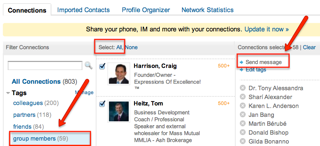
#8: Tag and Filter Connections to Organize and Build Relationships
Asking for a favor when you first meet someone is not smart networking. Thus, tagging your connections so that you can share useful information and build value over time is a great way to build mutually beneficial relationships that will serve you well. By classifying your connections as you add them, you will create a framework that allows for filtering them in ways that are advantageous to your networking strategy. #9: Use Context to Acquire Business Intelligence
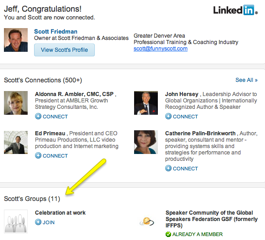
One way to use LinkedIn to acquire business intelligence is to study the interrelationships of your contacts. For example, if one of your competitors is connected to your new contact, then you can use that contextual intelligence to minimize risk – just as you also can discern potential opportunities from their second- and third-degree connections. Another way to use the context of your network is for finding better LinkedIn groups. There are thousands of groups on LinkedIn, but your trusted connections can lead you to those that may be best-suited to you a |
|
#10: Periodically Update Your CRM with Data from LinkedIn
One of the challenges of CRMs is that you have to consistently enter fresh data to derive maximum value from them. Take advantage of the fact that most of your LinkedIn connections are keeping their contact information current by periodically importing that data into your CRM.
LinkedIn has a feature for downloading your connections into a CSV file (like an Excel file) that can then be imported into your CRM. If you do this at least a couple of times a year, you will always have the most current contact information at your fingertips for staying connected.
LinkedIn is a network designed for professionals, one in which the individual is the center of the ecosystem. This is why taking steps to fully enhance your personal profile is the surest strategy for making the most of LinkedIn for your business.
How about you?
One of the challenges of CRMs is that you have to consistently enter fresh data to derive maximum value from them. Take advantage of the fact that most of your LinkedIn connections are keeping their contact information current by periodically importing that data into your CRM.
LinkedIn has a feature for downloading your connections into a CSV file (like an Excel file) that can then be imported into your CRM. If you do this at least a couple of times a year, you will always have the most current contact information at your fingertips for staying connected.
LinkedIn is a network designed for professionals, one in which the individual is the center of the ecosystem. This is why taking steps to fully enhance your personal profile is the surest strategy for making the most of LinkedIn for your business.
How about you?