Everything You Need To Know
About LinkedIn
The Most Awesome B2B Web Platform Available
LinkedIn is the world’s largest professional network with over 120 million members and growing rapidly. LinkedIn connects you to your trusted contacts and helps you exchange knowledge, ideas, and opportunities with a broader network of professionals.
Watch this short video for an overview of what LinkedIn is and how it can help you.
Watch this short video for an overview of what LinkedIn is and how it can help you.

What LinkedIn Does
Establish your professional profileLinkedIn gives you the keys to controlling your online identity. Have you Googled yourself lately? You never know what may come up. LinkedIn profiles rise to the top of search results, letting you control the first impression people get when searching for you online.
Find experts and ideasSometimes your immediate circle can’t resolve a unique business challenge. Tools like Answers and Groups let you locate and interact with experts through trusted introductions. LinkedIn Search lets you explore the broader network by name, title, company, location, and other keywords that will help you find the knowledge you’re looking for.
|
Stay in touch with business colleagues and friendsIn today’s professional world, people change jobs and locations constantly. By connecting on LinkedIn, your address book will never go out of date. Your contacts update their profiles, keeping you current with their latest jobs, projects and contact info. You’ll stay in closer contact with great tools to communicate and collaborate.
Explore opportunitiesWhether you’re looking for a career opportunity, winning new clients or building your professional reputation, LinkedIn connects you to jobs, sales leads and ideal business partners. With our powerful search engine, company research tools and a jobs board that shows who you know at listed companies, LinkedIn is the place to turn for new opportunities.
|
The Beginner’s Guide to LinkedIn
by Stephanie Buck
|
LinkedIn is considered the non-sexy, sleeping giant of social networks. It keeps a low profile, perhaps due to the professional nature of its users. Nonetheless, LinkedIn continues to exert a powerful influence on connected job seekers, brands, recruiters and industries.
Founded by Reid Hoffman in 2002, LinkedIn has grown to 161 million members in over 200 countries, making it the world’s largest professional network on the Internet (by comparison, Twitter has 500 million registered users, and Facebook has 900 million). Currently available in 17 languages, LinkedIn remains a relevant platform the world over. |
|
That being said, we doubt you spend 20 minutes on LinkedIn per day, like Facebook’s power users do. So, if you need a crash course on what LinkedIn has to offer, browse the network’s most prominent features below. Or send this to your recent grad as he or she prepares to enter today’s daunting job market.
Have you used LinkedIn to find a job, network with professionals or research hot topics in your industry? Please share your own tips in the comments below.
Have you used LinkedIn to find a job, network with professionals or research hot topics in your industry? Please share your own tips in the comments below.
1. Create Your Profile
|
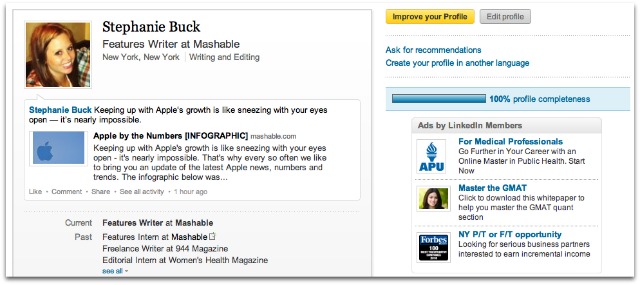
Like most social networks, LinkedIn hosts your personal profile, a page on which you may list information like job experience and professional skills.
However, unlike many other social networks, it’s important to complete your profile to the best of your ability — especially if you’re using LinkedIn for the job hunt. LinkedIn measures your “profile completeness” from 0-100%. |
The higher your profile completeness, the more likely you are to appear in search results. For instance, when you list skills like “Final Cut Pro” and “Photoshop,” potential employers may come across your profile when they perform an advanced search based on those keywords. Handy.
2. Get Connections
Of course, to get those “50 connections” mentioned above, you’ll have to expand your network on LinkedIn. Don’t worry — LinkedIn’s algorithms and data mining make it pretty easy.
I recommend first performing a series of basic searches to find people you know by name. (See the search box at the top of each LinkedIn page.) Click the “Connect” button next to people’s names to add them to your network. You may send a custom message along with that invitation to make the connection more personalized.
Once you have made several connections, head to the “People You May Know” page. LinkedIn’s algorithm will likely have begun determining additional suggestions based on your connections’ networks. LinkedIn labels these connections by degree. People you’re already connected to are “1st degree” connections. People you’re not yet connected to, but who are linked to your 1st degree connections, are 2nd degree connections. And so on. You’ll see a blue icon that says “1st,” “2nd” or “3rd” next to their names.
You may also choose to connect your email’s contact list to LinkedIn for the purpose of finding additional connections. Head to “Import Contacts” and allow access to your contacts to pull up a list of potentials. Be aware, however, that this may generate a huge list of people, especially if email services like Gmail tend to save every address you’ve ever contacted.
If you don't have many contacts, try this ti improve your profile: 11 Best Sites to Buy LinkedIn Connections and Followers (2020)
I recommend first performing a series of basic searches to find people you know by name. (See the search box at the top of each LinkedIn page.) Click the “Connect” button next to people’s names to add them to your network. You may send a custom message along with that invitation to make the connection more personalized.
Once you have made several connections, head to the “People You May Know” page. LinkedIn’s algorithm will likely have begun determining additional suggestions based on your connections’ networks. LinkedIn labels these connections by degree. People you’re already connected to are “1st degree” connections. People you’re not yet connected to, but who are linked to your 1st degree connections, are 2nd degree connections. And so on. You’ll see a blue icon that says “1st,” “2nd” or “3rd” next to their names.
You may also choose to connect your email’s contact list to LinkedIn for the purpose of finding additional connections. Head to “Import Contacts” and allow access to your contacts to pull up a list of potentials. Be aware, however, that this may generate a huge list of people, especially if email services like Gmail tend to save every address you’ve ever contacted.
If you don't have many contacts, try this ti improve your profile: 11 Best Sites to Buy LinkedIn Connections and Followers (2020)
3. Groups (Join Relevant Groups Or Create Your Own
To ensure that your profile is 100% complete, LinkedIn recommends including the following information.
|
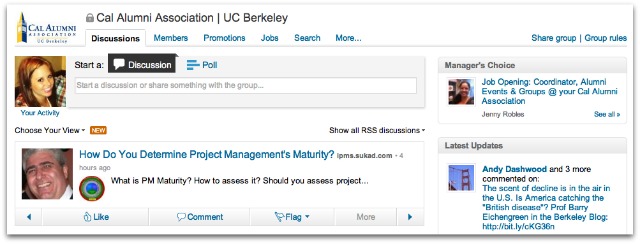
LinkedIn groups are spaces in which professionals and experts can share content, ask for advice, post or search for jobs and network with others. Groups are tailored to brands, associations and societies, support groups, causes, publications and industries in general. That can mean anything from “On Startups – The Community for Entrepreneurs” to “Cal Alumni Association | UC Berkeley.”
On the other hand, don’t confuse LinkedIn “groups” with “companies.” Coca-Cola has a “Coca-Cola Current & Former Employees” group, but its business lives on “The Coca-Cola Company” company page. More on that later. With over 1.3 million groups to choose from, you’re likely to find at few that fit your field and interests. Keep in mind that many groups require authentication before the manager permits you to join. However, nearly one-third of groups don’t require review, and are labeled “open.” Once you’re familiar with group functions, you may choose to create your own group. That means you’re the group owner, but you may also appoint a group manager and moderator, who are responsible for supervising discussions, subgroups, settings, etc. To get the most out of your LinkedIn group, take a look at the following features: |
4. Companies
|
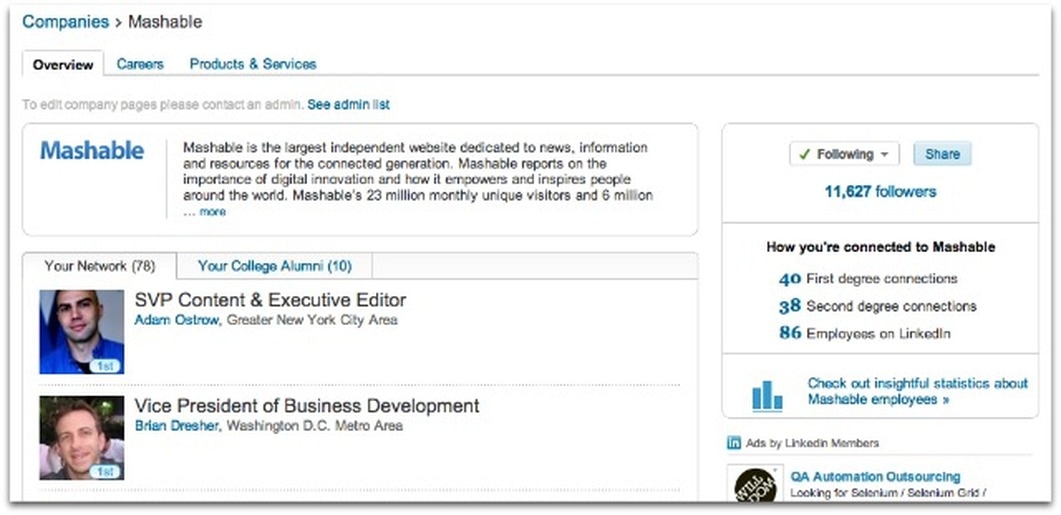
Just as you have a personal profile page, many companies choose to represent themselves on LinkedIn, too. Like Facebook brand pages, you may choose to follow the activity and updates of companies on LinkedIn.
Company pages contain general information, such as a business overview, list of employees and press mentions. Many companies also choose to list job openings on their pages, and some even encourage applicants to apply through LinkedIn, a very handy tool of the network. |
5. Jobs (If You want To Find A Job Or Find A Recruit)
Job search and recruitment tools are among LinkedIn’s most valuable features. More and more companies are encouraging candidates to apply for jobs via LinkedIn, due to the social network’s credibility and ease-of-use.
Head to the “Jobs” tab, where you’ll find options for applicants. Perform an advanced search for available jobs by keyword, title, location, company, salary and industry. (A search for “developer” within 50 miles of Manhattan turned up 488 results.) Save jobs to review later, and even save searches to check back later for updated results.
As an employer, you may post an available job to LinkedIn for $295 for a 30-day period. (Bulk packages are available for better deals.) Once posted, these jobs will not only appear in search results, but also in the “Careers” tab on your company page.
Finally, recruiters may “find talent” on LinkedIn, but they must upgrade to a premium subscription plan to search for potential hires.
Head to the “Jobs” tab, where you’ll find options for applicants. Perform an advanced search for available jobs by keyword, title, location, company, salary and industry. (A search for “developer” within 50 miles of Manhattan turned up 488 results.) Save jobs to review later, and even save searches to check back later for updated results.
As an employer, you may post an available job to LinkedIn for $295 for a 30-day period. (Bulk packages are available for better deals.) Once posted, these jobs will not only appear in search results, but also in the “Careers” tab on your company page.
Finally, recruiters may “find talent” on LinkedIn, but they must upgrade to a premium subscription plan to search for potential hires.
6. Updates
|
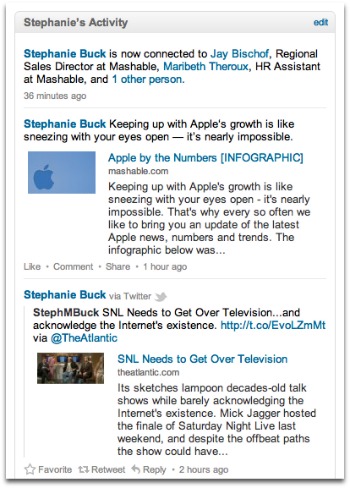
Unlike content shared on social networks like Facebook and Twitter, LinkedIn updates tend to be industry- and professionally-focused. Keep that in mind if you’re attempting to increase engagement.
You can share updates from a number of different places, both on LinkedIn.com and from outside web properties. Post a status update from the LinkedIn homepage, and it will be shared as well as posted to your profile under the activity feed. Also, when you engage in discussions in LinkedIn groups, that activity counts as an update. |
Post updates from sites like The New York Times by clicking the LinkedIn social share button next to an article. Or add the LinkedIn sharing bookmarklet to your browser toolbar to quickly share most sites as an update.
Finally, you may also connect your Twitter account to LinkedIn. This not only expands your network, but allows you to post tweets on LinkedIn as if they were status updates. Once tweets post to LinkedIn, users can interact with them as if from Twitter.com, by retweeting, replying and favoriting. Like updates, tweets post to the homepage and live in the activity feed on your profile.
Just as LinkedIn advises brands to cool it on excessive updates, you should practice the same self-control. Users appreciate information, not excessive traffic on their feeds. That being said, you can mute certain connections, if you choose. Hover over a user’s update on the homepage and click the “hide” button to stop receiving updates from that user.
Once you follow a company, you’ll see its updates appear on your LinkedIn homepage alongside those of your connections. Mashable, for instance, tends to post business-related articles on LinkedIn, since that seems to be the content most pertinent to the network’s audience. Businesses also use LinkedIn to post company announcements, such as acquisitions, new hires or updated policies. LinkedIn warns against update spam, however: “Businesses that post updates excessively are subject to review by LinkedIn and could risk having their page deleted.”
If you’re interested in adding your own company to the network, LinkedIn advises you take the following steps.
Finally, you may also connect your Twitter account to LinkedIn. This not only expands your network, but allows you to post tweets on LinkedIn as if they were status updates. Once tweets post to LinkedIn, users can interact with them as if from Twitter.com, by retweeting, replying and favoriting. Like updates, tweets post to the homepage and live in the activity feed on your profile.
Just as LinkedIn advises brands to cool it on excessive updates, you should practice the same self-control. Users appreciate information, not excessive traffic on their feeds. That being said, you can mute certain connections, if you choose. Hover over a user’s update on the homepage and click the “hide” button to stop receiving updates from that user.
Once you follow a company, you’ll see its updates appear on your LinkedIn homepage alongside those of your connections. Mashable, for instance, tends to post business-related articles on LinkedIn, since that seems to be the content most pertinent to the network’s audience. Businesses also use LinkedIn to post company announcements, such as acquisitions, new hires or updated policies. LinkedIn warns against update spam, however: “Businesses that post updates excessively are subject to review by LinkedIn and could risk having their page deleted.”
If you’re interested in adding your own company to the network, LinkedIn advises you take the following steps.
- You’re a current company employee and your position is on your profile.
- A company email address (e.g. john@companyname.com) is one of the confirmed email addresses on your LinkedIn account.
- You associate your profile with the right company. You must click on a name from our company name dropdown list when you edit or add a position on your profile.
- Your company’s email domain is unique to the company.
- Your profile must be more than 50% complete.
- You must have several connections.
7. Applications
Applications allow LinkedIn users to customize their profiles and share content in different ways. For example, you may choose to add the WordPress app so that your latest WordPress blog posts share with your LinkedIn network. Do the same for SlideShare presentations you or your company have created.
Keep in mind that most apps require permissions to access some of your basic profile information, such as your name or job title. However, all applications must abide by LinkedIn’s privacy policy, which means they’re not allowed to reach any private information not easily accessible by browsing the site.
Learn about some of the top LinkedIn apps here:
Keep in mind that most apps require permissions to access some of your basic profile information, such as your name or job title. However, all applications must abide by LinkedIn’s privacy policy, which means they’re not allowed to reach any private information not easily accessible by browsing the site.
Learn about some of the top LinkedIn apps here:
8. Mobile
|
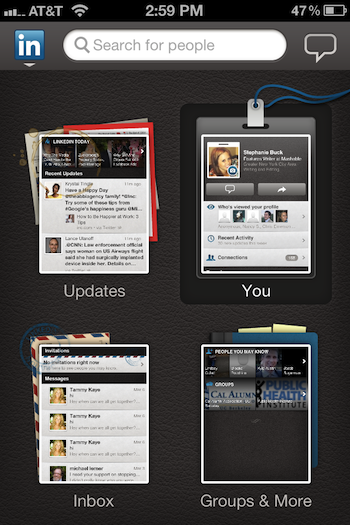
LinkedIn has mobile applications for iPhone, iPad, Android, BlackBerry, Windows and Palm devices. The app is useful for posting status updates and checking group updates on-the-go, but its inherent advantages lie in networking.
Pull up the mobile app to find LinkedIn connections and exchange information at events. After meeting someone, you may choose to email that person a link to your profile, so he or she may connect with you later — no business cards needed. Or search for that person on your LinkedIn mobile app and add him as a connection then and there. You may also choose to download LinkedIn connections to your smartphone’s address book for later contact. For more information on LinkedIn’s mobile presence, see below: |
9. Upgraded Account
Once you’ve explored LinkedIn Free, you may choose to upgrade to a LinkedIn account with more features. Starting at $15.95 per month, LinkedIn has premium subscription plans for businesses, job seekers, recruiters and more.
One of the distinguishing features of most upgraded accounts is the ability to send InMail to anyone. InMail is an internal LinkedIn message sent to a person with whom you are not connected. You can message people you are already connected with free-of-charge, but you can’t message non-connections; you must InMail them — and those InMails are limited. The Basic business premium account allows you three InMails per month, while the Business Plus plan allows 10, and the Executive 25 per month. So, choose your InMails wisely.
Upgraded accounts also have access to more search results, which can be a huge bonus for LinkedIn recruiters. You also have access to additional tools for saving and organizing profiles, and you can view the full list of people who have viewed your LinkedIn profile.
One of the distinguishing features of most upgraded accounts is the ability to send InMail to anyone. InMail is an internal LinkedIn message sent to a person with whom you are not connected. You can message people you are already connected with free-of-charge, but you can’t message non-connections; you must InMail them — and those InMails are limited. The Basic business premium account allows you three InMails per month, while the Business Plus plan allows 10, and the Executive 25 per month. So, choose your InMails wisely.
Upgraded accounts also have access to more search results, which can be a huge bonus for LinkedIn recruiters. You also have access to additional tools for saving and organizing profiles, and you can view the full list of people who have viewed your LinkedIn profile.
Our Group member Stats As Of March 2, 2016